Prescreening

An online pass over the company by a model: identification, ownership, governance, financials, regulatory history, and a Low / Medium / High risk assessment with a rationale.

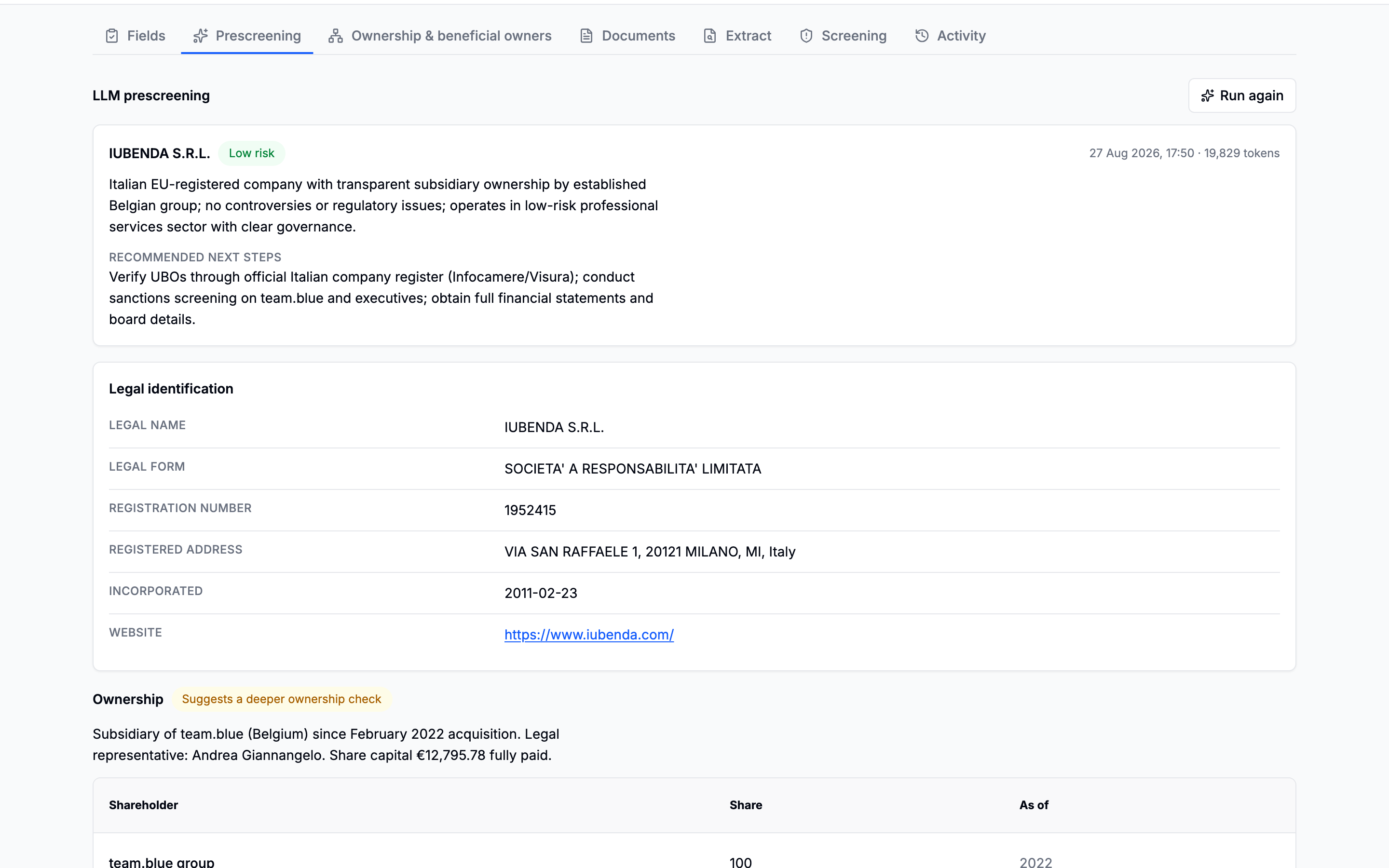
A prescreening report with a risk badge, a rationale, and blocks for identification, ownership, governance, financials and regulatory history

It sits second in the tabs, right after Fields, because it is the cheapest thing to read and what it is for is telling you which of the expensive tabs are worth spending money in.

What it is not

It establishes nothing. Everything else on a case comes from somewhere accountable (a register, a bought document, a watchlist check) and is worth what its source is worth. This is a model reading the public web.

Hence the shape of the panel. The risk assessment is a heading with a rationale rather than a verdict, and every report ends in its sources, because the links are the part of it you can actually check.

The company it is about

Named from the register's record rather than from what somebody typed into the search box. The failure worth designing against is a confident report about a different company with a similar name.

On a manual case there is no register record, so it is named from what was entered, which is one more reason the manual form asks for the registration number if you have it.

The two source lists

They are kept apart on purpose.

The sources section of a prescreening report, with a collapsible pages consulted list beneath it
Cited sources first; everything the searches opened, folded away beneath.
  • Sources: the handful the model wrote into the report, titled, dated, the ones it stands behind.
  • Pages consulted: assembled from the run itself, every page a search opened, including the ones the answer never quoted.

Merging them would bury the answer to where does this come from under the answer to what did it look at. The two often coincide exactly, and that is fine. What matters is that when they differ, the pages read and then passed over are visible, because they are the ones nobody could otherwise know about.

When the answer cannot be read

The model is asked for a structured report, and a prompt is not a contract. When what comes back cannot be read as one, the panel shows what actually came back, as text, and says that it could not be parsed. The answer was paid for; hiding it would be the second loss after the first.

Individual fields degrade on their own, too. A percentage that arrived as "~30% (free float)" simply goes absent and the rest of the report survives. Nothing about a paid answer is discarded over one field.

What it feeds, for free

  • The Fields tab. Half of what a prescreening contains matches the identity block by name, so a report bought for one purpose answers those fields as a fourth, weaker source, cited with the report's own links.
  • A manual case's ownership. Its shareholder list is offered as the first draft of a structure entered by hand. See Ownership entered by hand.

Reports outlive their runs

Asking again discards the run, which is what frees the question up to be asked, but the reports stay, oldest ones folded away. What did it say last month remains answerable.

Earlier prescreening reports collapsed beneath the latest one
The report is the document; the run is only the receipt for how it arrived.
If the tab says prescreening is not configured

The model access it needs has not been set up on your deployment. Everything else on the case works. Ask support.